
 English
  Tiếng Việt
There are at least 3 ways to top up Sim 3G for iPad that users may not know. Hereafter, 3G WIFI introduces to users 3 simplest ways to top up Sim 3G for Ipad without removing the 3G Sim.
If it's a phone, normally when topping up Viettel card, we press *100*card code#, but with iPad, which is not a regular phone, doing so will surely not work. Instead, when inserting a Sim, such as Viettel 3G Sim, users must follow the 3 methods below.
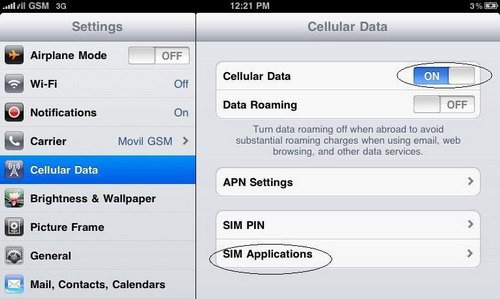 Step 2: You are in the Sim Applications section, then you select utilities
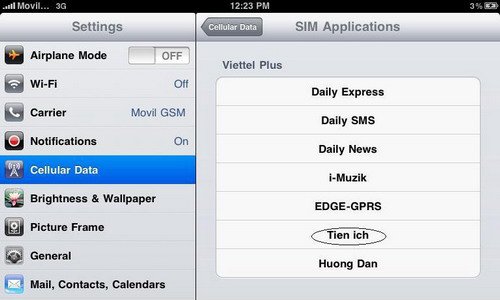 Step 3: In the utilities section, you will select Top up account.
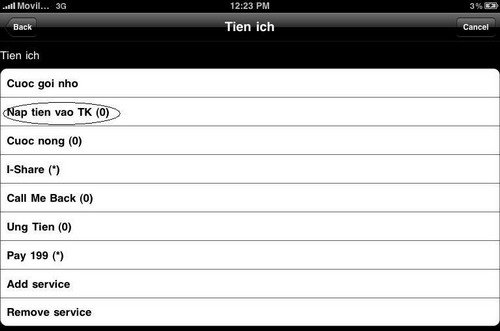 Step 4: Enter the card code then press SEND.
How to Top Up 3G SIM for iPad Without Removing the 3G SIM
How to top up Viettel card on 3G SIM for iPad in the setting section
Step 1: Go to Settings → Cellular Data → Sim Applications.
Step 2: You are in the Sim Applications section, then you select utilities
Step 3: In the utilities section, you will select Top up account.
Step 4: Enter the card code then press SEND. Top up Viettel card on 3G SIM for iPad using QueryUSSD application
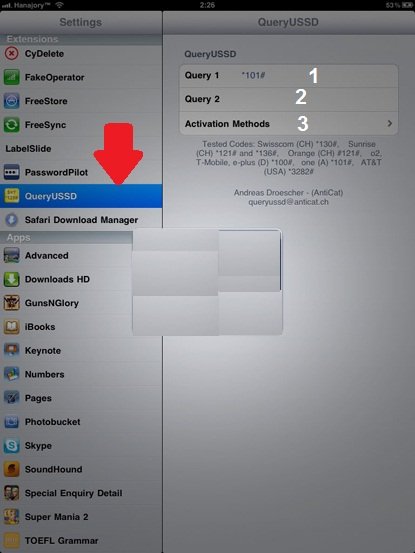
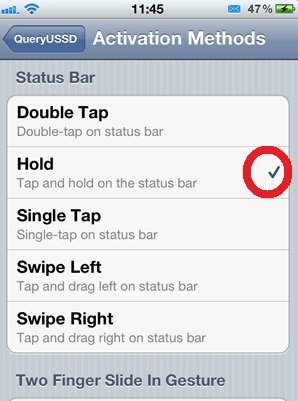
This method is completely new and surely many people don't know about it. It is suitable for those who like to explore new things. This is a Cydia application called QueryUSSD that helps us check account balance and top up very simply. To have Cydia, your iPad must be jailbroken first. Step 1: After installing QueryUSSD on Cydia, you will proceed to add the QueryUSSD item by going to Settings. In the QueryUSSD section, there are 3 functions: 1 – check account balance, 2 – where to enter the top-up code, 3 – customize command activation method.- Summary of 3G WiFi Routerlatest today
Top up Viettel card for 3G Sim for iPad via website
- Viettel 3G Simcustomers to the page: naptien.viettel.vn
- Vinaphone 3G Simaccess the page: naptien.vinaphone.com.vn or 10.1.10.69 to check usage or top up
- Mobifone 3G Simaccess the page: naptien.mobifone.com.vn